Data Science/시각화
파이썬 시각화 막대그래프 그리기 Matplotlib.pyplot - bar
상어군
2021. 10. 13. 10:18
반응형
Matplotlib의 pyplot은 다양한 시각화 기법(그래프)를 지원합니다.
그중에서 plot을 통해서 막대그래프(bar chart)를 그려보겠습니다.
import matplotlib.pyplot as plt

x_lst = [1,2,3,4,5]
y_lst = [3,4,5,2,1]

plt.bar(x_lst, y_lst, width=0.8)

plt.show()
1. x_lst, y_lst
그래프의 X축/Y축 좌표, 두 리스트의 길이는 동일해야합니다.
2. width
width는 막대그래프의 두께를 나타냅니다.
해당 파라미터를 지정하지 않아도 0.8로 기본 설정됩니다.
1로 지정시 막대간의 여백이 없어집니다.
3. 그외의 속성, 누적 막대그래프 그리기
기준값(bottom), 막대정렬기준(align), 막대 색(color) 등 다양한 속성을 지정할 수 있습니다.
또한 legend, xlabel, ylabel, title 등을 통해서 그래프를 꾸밀 수 있습니다. (Matplotlib.pyplot 공통)
import matplotlib.pyplot as plt

x_lst = [1,2,3,4,5]
y_lst = [3,4,5,2,1]
y_lst2 = [1,2,3,1,1]


plt.bar(x_lst, y_lst, width=0.5, bottom=5, align='edge', color='#AB1212')
plt.bar(x_lst, y_lst2, width=0.5, bottom=5)


plt.show()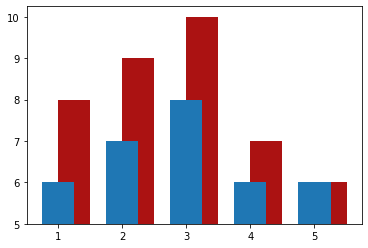
누적 막대그래프는 bottom 파라미터를 사용하여 그릴 수 있습니다.
import matplotlib.pyplot as plt

x_lst = [1,2,3,4,5]
y_lst = [3,4,5,2,1]
y_lst2 = [1,2,3,1,1]


plt.bar(x_lst, y_lst, width=0.5, color='#AB1212')
plt.bar(x_lst, y_lst2, width=0.5, bottom=y_lst)


plt.show()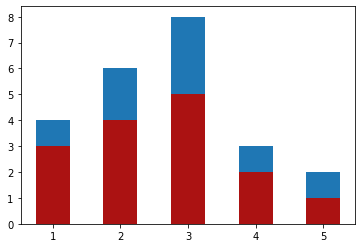
Matplotlib.pyplot - plot의 모든 속성의 종류는 아래와 같습니다.
| 속성 | 설명 |
| agg_filter | a filter function, which takes a (m, n, 3) float array and a dpi value, and returns a (m, n, 3) array |
| alpha | scalar or None |
| animated | bool |
| antialiased or aa | unknown |
| capstyle | CapStyle or {'butt', 'projecting', 'round'} |
| clip_box | Bbox |
| clip_on | bool |
| clip_path | Patch or (Path, Transform) or None |
| color | color |
| contains | unknown |
| edgecolor or ec | color or None or 'auto' |
| facecolor or fc | color or None |
| figure | Figure |
| fill | bool |
| gid | str |
| hatch | {'/', '\', '|', '-', '+', 'x', 'o', 'O', '.', '*'} |
| in_layout | bool |
| joinstyle | JoinStyle or {'miter', 'round', 'bevel'} |
| label | object |
| linestyle or ls | {'-', '--', '-.', ':', '', (offset, on-off-seq), ...} |
| linewidth or lw | float or None |
| path_effects | AbstractPathEffect |
| picker | None or bool or float or callable |
| rasterized | bool |
| sketch_params | (scale: float, length: float, randomness: float) |
| snap | bool or None |
| transform | Transform |
| url | str |
| visible | bool |
| zorder | float |
누적 막대그래프 또는 여러 막대그래프를 한 그래프 안에 그리는 부분에서 matplot은 불편함이 있습니다.
따라서 matplot을 꼭 쓰셔야 하는게 아니라면 seaborn 등 그외의 라이브러리를 추천드립니다.
참고문헌
https://matplotlib.org/stable/api/_as_gen/matplotlib.pyplot.bar.html#matplotlib.pyplot.bar
반응형